








How We Fixed a Prompt That Gave Every AI Report an EV Section
Batch LLM report generation with zero failures, yet a prompt tuned on one industry gave all 201 reports an EV section. How we caught it and what fixed it.

TL;DR
- A batch job that ends with zero failures can still be wrong in every output: our run wrote 201 industry reports in 41 minutes, and all 201 had a section that only made sense for vehicle industries.
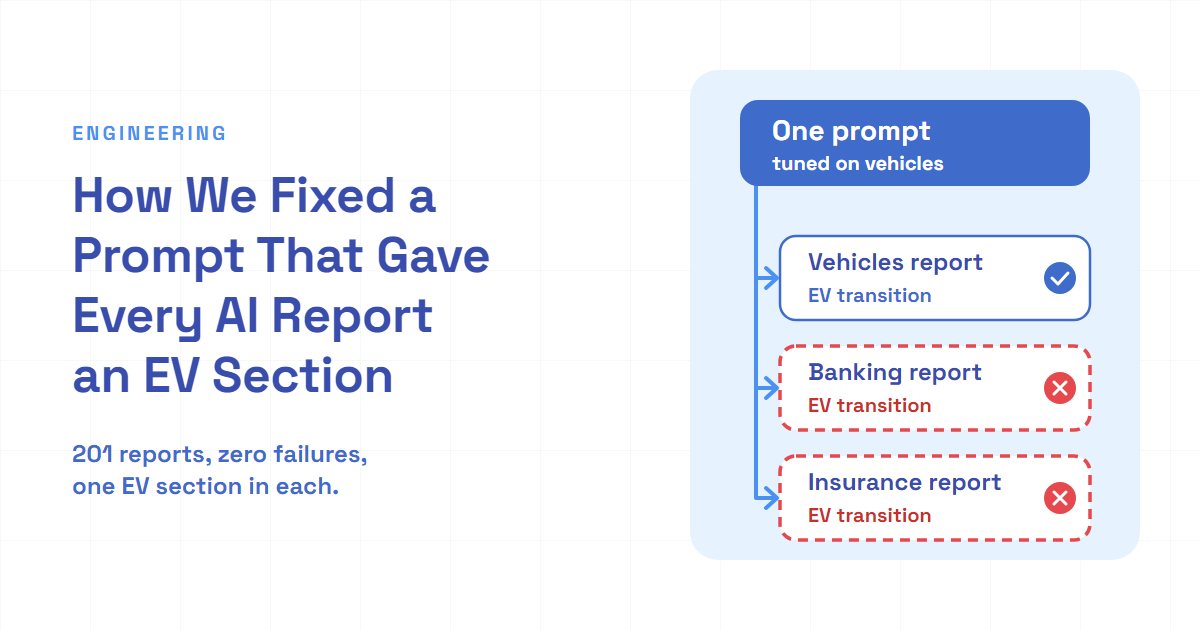
- A prompt tuned on one example carries that example's assumptions to every other input. Switching to general sections, with extra topics only when the data supports them, cut the off-topic section from 201 of 201 reports to the 6 vehicle industries out of 168.
- Before you run a batch, read the output for the inputs least like the one you tested on, and ask for the long report and its short title-and-FAQ fields in separate model calls: free text for the report, a fixed fill-in-the-fields format for the rest.
Our batch job finished in 41 minutes. 201 reports, no failures, no warnings. Every one of them was wrong in the same place.
You've probably done a smaller version of this. You reuse last year's cover letter for a new application, change the greeting and the job title, and send it. Then you notice the third paragraph still says how much you'd love to work at the old company. The template was fine. It was just written for one case, and it carried that case along.
Multibagg AI is an AI-powered stock research platform for Indian investors. Every month we publish an AI-written report on each industry we cover, and our chat assistant answers questions from those reports, so a report that talks about the wrong things misleads readers and the assistant alike.
Here's how a prompt I tuned on one industry leaked into all 201 reports, why the batch couldn't notice, and the small changes that fixed it.
| Measured in the published reports | First batch (prompt tuned on one industry) | Next monthly run (general prompt) |
|---|---|---|
| Reports | 201 | 168 |
| Reports with an "EV transition" section | 201 | 6, all vehicle industries |
| Reports with an "Exports" section | 201 | 0 |
| Reports saved with an FAQ list from the structured call | not used yet | 168 |
Counted from the published report files of both runs.
A prompt tuned on the one industry we tested
The job is a monthly pipeline that writes one long report per industry. For each industry it does five things:
- Loads the recent company documents for that industry, such as investor presentations and earnings-call transcripts.
- Pulls the facts out of them with a model, up to 10 documents per call.
- Runs 6 web searches for recent context.
- Writes the report in one model call, as markdown.
- Writes a short title, a description and a few suggested questions in a second call.
I started the rewrite on a single industry, two- and three-wheelers, because I wanted to see one good report before touching the rest. I asked the coding assistant for a more professional tone, better formatting, web search, search-friendly structure, and timing and cost per step. The report prompt that came out of that work had a fixed list of sections. Simplified, the old version looked like this:
const REPORT_SECTIONS = [
  "Overview",
  "Market size and volumes",
  "Competitive landscape",
  "Financial profile",
  "EV transition",
  "Policy and regulation",
  "Exports",
  "Risks",
  "Outlook",
  "Company snapshots",
] as const

const SEARCH_TOPICS = [
  "market size",
  "sales volume",
  "EV adoption",
  "incentive schemes",
  "exports",
  "outlook",
] as const

function buildReportPrompt(industry: string): string {
  const sections = REPORT_SECTIONS.map((section, i) => `${i + 1}. ${section}`).()

}
For two-wheelers, "EV transition" and "Exports" are exactly the right sections. Electric scooters are a big story there, and so are exports. The search topics fit too. That's the trap: the prompt was correct for the input I was looking at.
The coding assistant even flagged it on day one. Its first summary had a table of caveats, and one row said the prompt and the searches were written for automotive and needed changing before other industries. I read the test report, said it looked good, asked for 5-6 key takeaways and no citation markers, and moved on. The caveat sat in a table. Nothing turned it into a check.
A resumable batch that did its job well
Once the single report looked right, I asked for all industries at once: batches of 20, a log file with a proper format, and a record of which industries were done, so a rerun would only pick up the rest. Simplified, the runner looks like this:
import { existsSync, readFileSync, writeFileSync } from "node:fs"

type Status = "done" | "skipped" | "failed"
type Outcome = { status: Status; reason?: string }
type Progress = Record<string, Outcome & { finishedAt: string }>

export async function runInBatches(
  ids: string[],
  processOne: (id: string) => Promise<Outcome>,
  : ,
  batchSize = ,
): <> {
   :  = (progressPath)
    ? .((progressPath, ))
    : {}
   pending = ids.( progress[id]?. !== )

   record = (: , : ):  {
    progress[id] = { ...outcome, :  ().() }
    (progressPath, .(progress, , ))
  }

   ( i = ; i < pending.; i += batchSize) {
     batch = pending.(i, i + batchSize)
     .(
      batch.(
        (id)
          .((: ):  ({ : , : (error) }))
          .( (id, outcome)),
      ),
    )
  }
   progress
}
Three details carry the weight:
- Each item writes its own status the moment it finishes. If the process dies partway through a batch, the items that already finished are on disk, and a rerun skips them.
- Only "done" counts as done. Skipped and failed items are retried on every rerun. A skip costs nothing, because the item stops before any paid call when it has no documents.
- One failure can't sink a batch.
Promise.allrejects as soon as any promise rejects, so each item catches its own error and turns it into a "failed" status. The batch always waits for all 20.
flowchart TD
    A["Load the progress file"] --> B["Keep items not marked done"]
    B --> C["Take the next 20"]
    C --> D["Run all 20 in parallel"]
    D --> E["Write done, skipped or failed for each item as it finishes"]
    E --> F{"Items left?"}
    F -->|"yes"| C
    F -->|"no"| G["Log the summary: counts, cost, total time"]
The run covered 202 industries in 11 batches. It took 40.8 minutes: 201 done, 1 skipped and 0 failed. The skipped industry had no companies assigned to it any more. I reran the command right after, as a resume test, and it skipped the 201 finished industries, retried only that one, skipped it again and spent nothing.
The single-industry dry runs before this had already caught two real bugs. A stray debug line in the search helper tried to dump the raw search response to a file. That response couldn't be written out as text, so the line threw on every call. Every search counted as a failure, and the report was written without any web context. Nothing in the output said so. The second bug was a missing charset=utf-8 on the uploaded markdown files. Opened straight from storage, "India’s" showed up as "India’s", because the browser fell back to an older encoding and read each of the three bytes of the curly apostrophe as its own character.
Both were bugs a dry run is good at: things that crash, or look broken on any input. The content assumption wasn't one of them, because the dry run used the very industry the prompt was written for.
Zero failures, 201 wrong reports
Two days later I opened the pull request that moved this pipeline into the monthly job, and ran an AI code review on it. Its first blocker: the report prompt and the web searches only made sense for the auto industry, so every other industry would get irrelevant or invented sections.
I had the coding assistant check the 201 reports that were already live. All 201 had an "EV transition" section. The banking report had "Banks EV Transition" and "Banks Exports". Life insurance had "Life Insurance Exports". Advertising and media agencies had an EV transition section of their own.
The model didn't refuse a section that didn't fit. It filled it. The banking report's EV section discussed how banks position themselves in EV finance, and its exports section found "exposure channels". Each report was fluent, specific and full of real numbers, which is exactly why a skim didn't catch it. The section was wrong, not the sentences.
That's what "zero failures" meant here. The batch measured whether each step ran: documents loaded, model calls returned, files uploaded, rows saved. It didn't measure whether the report fit the industry, and nothing in the pipeline could, because the prompt asked for those sections by name.
General sections, and topics only when the data has them
The fix was mostly deletion. The section list became general, and the industry-specific themes moved from the list into a rule:
const GENERAL_SECTIONS = [
  "Overview",
  "Market size and demand",
  "Competitive landscape",
  "Financial profile",
  "Growth drivers",
  "Policy and regulation",
  "Risks",
  "Outlook",
  "Company snapshots",
] as const

const SEARCH_TOPICS = [
  "market size",
  "demand outlook",
  "growth drivers",
  "policy and regulation",
  "latest quarterly results",
  "key risks",
] as const

function buildReportPrompt(industry: string): string {
  const sections = GENERAL_SECTIONS.map((section, i) => ).()
   [
    ,
    ,
    ,
    ,
  ].()
}
Two choices in there are deliberate. The themes didn't disappear, they became conditional, so the vehicle reports can still have their EV section and a banking report can grow a credit-growth section if its documents talk about one. And the search topics went general too. A search for "EV adoption" next to the industry name returns EV results for any industry, and the report writer uses whatever context it's given.
Two model calls, and a schema only for the short fields
While the prompt was open, I asked a question I'd been sitting on: should the report, the title and the FAQ come from one call? And would structured output for the report hurt its quality?
The numbers from the test run made it simple. The title call was about 3% of the total model cost per report and took about 5 seconds. Merging would save that, and it would put everything into one call that fails as a unit, so a bad response would lose the report, the title and the FAQ together. Putting a report of several thousand words inside a JSON string adds its own risk: thousands of escaped quotes and line breaks, and if the model runs into its output limit, a cut-off markdown report is just short, while a cut-off JSON object can't be parsed at all. There's also research finding that strict format constraints can lower a model's reasoning quality, and the report is the product.
So I kept two calls, and moved the FAQ into the second one. Until then, the report call wrote the FAQ as its last section, and a small parser cut it out by finding the heading. If the model changed the heading's wording, the FAQ was silently lost. In the metadata call, a schema fixes the shape:
import { z } from "zod"

const ReportMetadata = z.object({
  title: z.string(),
  description: z.string(),
  faq: z.array(z.object({ question: z.string(), answer: z.string() })),
})

type ReportMetadata = z.infer<typeof ReportMetadata>

export function parseMetadata(content: string | null | undefined): Partial<ReportMetadata> {
  if (!content) return {}
  return ReportMetadata.parse(JSON.parse(content))
}
The schema goes to the model as a strict structured-output format, so the reply comes back in this shape, and the parse checks it again on our side. The empty case matters more than it looks. When the metadata call comes back with nothing, the function returns no fields at all, and the save leaves the stored title, description and FAQ alone. Returning an empty string or an empty list instead would wipe good data on every failed rerun. A malformed reply throws, the industry is recorded as failed, and the next run retries it. The FAQ parser was deleted.
flowchart LR
    A["Company documents for one industry"] --> B["Extract facts, up to 10 documents per call"]
    W["6 general web searches"] --> C["Report call: free markdown"]
    B --> C
    C --> D["Metadata call: schema with title, description and FAQ list"]
    D --> E["Save the report and its metadata"]
The review had a few smaller points, and two of them changed the design. The first: when all 6 searches come back empty, the job now writes a warning to its log and sends a separate alert, but the report is still generated and the job still counts as a success. That closes the gap the debug line had shown, where a report quietly lost its web context. The second: I had capped the report at 4,000 to 6,000 words for readability, but the same reports feed our chat assistant, so a shorter report meant shallower answers. I dropped the cap and asked for detailed, data-rich content instead.
What the next run showed
The monthly job ran for the first time three days after the change merged, with the general prompt, the general searches and the FAQ in the metadata call. It wrote 168 reports. The job writes a report only for an industry with documents in the current quarter so far, and in October, 35 industries from the first batch had none yet. One more had documents and still got no report, which I come back to at the end. Three of the 168 are industries the first batch didn't produce.
- The EV section showed up in 6 of 168 reports: two- and three-wheelers, cars and utility vehicles, commercial vehicles, agricultural and construction vehicles, automobiles, and auto components. Every one is an industry where electric vehicles are part of the story. None of the other 162 had it.
- No report had an "Exports" section. Export figures still appear where the documents discuss them, inside the general sections.
- All 168 reports came with an FAQ list: 163 with six questions and 5 with five.
- The metadata call, FAQ included, was under 1% of the run's total model cost. It now runs on a smaller model than the report call, so keeping it separate costs almost nothing.
What it cost
The general prompt makes reports more alike. Most of them now share the same nine headings, and an industry's special theme gets a section only when the model decides the data supports one. That decision is the model's, and the rule works only as well as the model follows it.
The batch itself was a production write. It overwrote each industry's live report for that period, so the off-topic sections went live the moment it finished. A resumable batch makes reruns cheap. It doesn't make a bad prompt cheap.
I also left an input out on purpose. I looked at adding annual reports to the documents. One annual report runs to about 990,000 characters, roughly 10 times an earnings-call transcript and 75 times an investor presentation, and the fact-extraction step sends up to 10 documents per call. Adding them properly would need a separate extraction step and a store for its results, so I dropped the idea and kept the pipeline as it was.
Lessons for anyone batching LLM output
- Test on the input least like the one you tuned on. My dry runs used the one industry the prompt was written for, so they could only confirm it. One run on banking would have shown the problem in its list of headings.
- A green batch measures the pipeline, not the content. Counting every heading that isn't in the general list, across all outputs, takes a few lines of code. One that shows up in 201 of 201 reports, across industries as different as insurance and advertising, stands out at once.
- A caveat in a status table is not a gate. The warning was there before the batch ran. If a known risk matters, turn it into a check or a test case, not a row someone reads once.
- Name themes as conditions, not as sections. "Add a section on X only when the data supports it" travels across categories. "Section 5: X" doesn't.
- Free text for long content, a schema for the small fields. Batch LLM report generation gets more reliable when each call returns the shape it's good at: the long report as free markdown, the title and FAQ as a strict schema.
The takeaway, and what's still open
A prompt you tune on one example is a template for that example. Before you run it across hundreds of inputs, read the output for the inputs least like your test case, and add one cheap check on the content, not just on whether each step ran.
A few things are still open:
- The older reports. 36 of the 201 industries from that first batch have no newer report yet, so their latest page still carries the off-topic sections. 35 of them had no new documents in October. The next step is to regenerate that period with the general prompt, and to find out why the one remaining industry got no report although it had documents.
- An automatic content check. The heading count from the lessons isn't part of the job yet. Today each report goes live as it finishes, so the check needs the batch generated somewhere unpublished first, then published only after the count passes.
- The conditional rule over time. Each monthly run adds evidence on whether the model keeps adding themes only where the data has them.
The second run is the result that counts: 168 reports, and the EV section appeared only where vehicles are the subject.