








How We Cut a Week-Long PDF Backfill to Three Days by Skipping Page Rendering
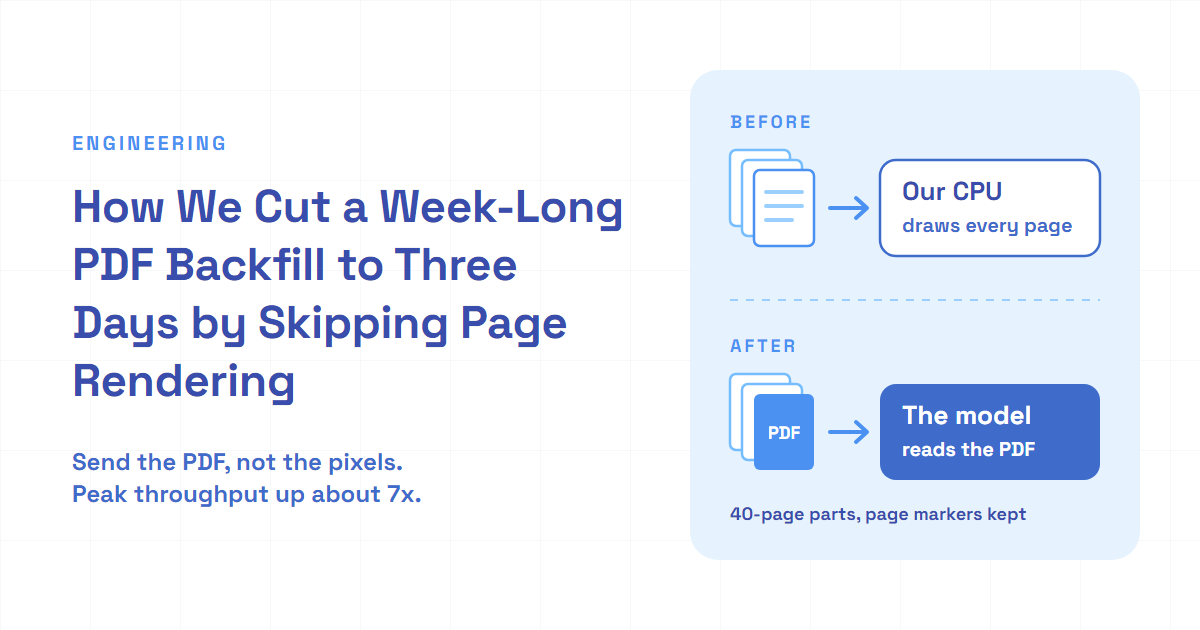
We stopped rendering PDF pages to images and sent PDFs directly to a vision LLM in 40-page parts. A week-long backfill finished in three days. Here's the cost.

TL;DR
- Turning every PDF page into an image on our own servers held a six-million-page backfill (a one-off catch-up job) to about 35,000 pages an hour, and adding processes on the same machine didn't move that ceiling far enough.
- Sending the PDF itself to the AI model, in parts of up to 40 pages, took that work off our CPUs, so many more documents could run at once and the job finished in three days instead of a week.
- Each document got slower, not faster. The model also read about the same amount of input per page (counted in tokens) as before, because the model provider still turns every page into an image on its own side.
We had close to six million PDF pages to turn into text, and at the speed we were going it would take a week. We added workers, then more processes, and the estimate still said a week. What finally worked was deleting a step, not making it faster.
You've probably felt a version of this on your own laptop. A big video export is crawling, so you start a second one next to it, then a third. The fan gets louder, every export slows down, and the total time hardly changes. When every copy needs the same processor, more copies just queue up for it.
Multibagg AI is an AI-powered stock research platform for Indian investors. Long company reports only become answerable once they're converted to text, so a week-long backfill means a week of answers that can't see those documents.
Here's how two rounds of scaling stalled, the question that removed the stage we were scaling, and what the shortcut cost.
Deleting the render stage raised peak throughput about 7x
The short version first. Every converted document records its page count, its tokens and how long it took, so the backfill left a clean record of all three versions of the pipeline.
| Measure | Rendering pages | PDF parts, comparable load | PDF parts, more in flight |
|---|---|---|---|
| Pages per hour | 34,757 | 29,678 | about 250,000 |
| Documents in flight, average | 21 | 31 | 377 to 467 |
| Seconds per page, p95 | 2.66 | 5.75 | 8.56 to 9.78 |
| Input tokens per page | 1,150 | 1,191 | 1,187 to 1,201 |
| Pages dropped one at a time | 167 | 0 | 0 |
Measured from per-document conversion records: a 4-hour window on the render path, 9 hours after the switch at comparable load, and two windows of 7 and 8 hours after we raised concurrency. Seconds per page is each document's conversion time divided by its pages; in flight means documents being converted at the same moment; p95 is the value 95% of documents came in under. A page dropped one at a time is a single failed page left as a gap; the native path fails whole documents instead, and those aren't counted in that row.
Read it from left to right. The switch alone made each page slower and didn't raise throughput. The gain came from running many more documents at once, and that only made sense once our own machine stopped drawing pages. The rest of this post is how we got there.
Our converter drew every page before the model read it
Not every document in our pipeline takes this path. Short text filings go to a layout parser that reads the PDF's own text. Long, design-heavy reports and slide decks go to a vision model instead, which writes markdown from what each page looks like. This post is about that second path.
The vision path, as the team had built it, worked page by page:
- Download the PDF.
- Take the next 5 pages and draw each one as an image at 160 DPI with mupdf, the WebAssembly build of the MuPDF renderer.
- Encode each image as a JPEG with sharp and turn it into a base64 data URL.
- Send the 5 images to the model in parallel, one request per page, and wait.
- Repeat until the last page, then join the pages with a marker line per page.
In generic form:
type PageImage = { pageNumber: number; dataUrl: string }

const BATCH_SIZE = 5
const DPI = 160

async function convertByRendering(pdf: Uint8Array, totalPages: number): Promise<string> {
    const pages: string[] = []
    for (let first = 1; first <= totalPages; first += BATCH_SIZE) {
        const last = Math.min(first + BATCH_SIZE - , totalPages)
         : [] = []
         ( pageNumber = first; pageNumber <= last; pageNumber++) {
             png = (pdf, pageNumber - , )
             jpeg =  (png)
             dataUrl =
            images.({ pageNumber, dataUrl })
        }
         texts =  .(images.( (image, totalPages)))
        texts.( {
             pageNumber = images[index].
            pages.()
        })
    }
     pages.()
}
Two details matter later. The page marker line, <!-- PAGE:12 -->, is how every step after conversion knows which page a piece of text came from. And a page whose request failed three times became a "Missing page" marker instead of failing the document, as long as no more than 5% of the pages went missing.
The draw call is synchronous. mupdf's toPixmap and asPNG return values, not promises, so drawing is pure CPU work inside the worker, and every job that draws competes for the machine's cores.
To see what one page costs, I ran the same library and settings on my laptop against a 152-page public report. Drawing a page blocked the process for p95 93 ms (p99 106 ms). Drawing plus JPEG encoding cost p95 156 ms of CPU (p99 187 ms), because sharp encodes on its own thread pool on top of that. Small for one page. At that p95 cost, the 250,000 pages an hour we reached later would have needed about 11 cores doing nothing but drawing and encoding, all of it on our side of the network.
Two rounds of scaling stalled at 35,000 pages an hour
The backfill ran on its own deployment, from a branch built for it, so it couldn't slow down live traffic. The changes below are mine, written with an AI coding assistant at my direction.
Round one: lanes. I gave the backfill its own queues. Layout-parser documents were split by page count, so short ones didn't wait behind 500-page ones, and each vision worker got its own tuned concurrency. In its first full hour, the render path converted about 14,000 pages.
Round two: more processes. My reasoning in the commit was simple: one Node process draws pages on one core, so start several worker processes per queue and raise the concurrency of each. I'd asked whether a worker used one core or the whole machine, and the fan-out was my answer. Throughput rose to about 35,000 pages an hour and stayed there.
The premise was half wrong. BullMQ's source shows that a sandboxed worker keeps a pool of child processes and gives each concurrent job its own, so a single queue at concurrency 10 can already use 10 processes. The fan-out mostly raised how many jobs ran at once. It didn't add a single core.
At 35,000 pages an hour, the 5.9 million pages ahead of us meant about 170 hours. A week.
Why do we need the rendering stage at all?
That was the question I asked next, and it changed the problem. We were drawing pages because the model needed images. But vision model APIs now accept a PDF file directly. OpenAI's docs say the API extracts both the text and an image of each page and sends both to the model. So the drawing still happens. It just doesn't happen on our CPUs.
So the real question was whether we could send PDFs directly to a vision LLM and let our own processes do nothing but wait on the network. I asked the coding assistant for a prototype. A 5-page document converted in about 27 seconds, with our CPU near zero the whole time. Before switching the backfill over, I checked our token quota against the size of the whole backfill, because running several times more pages an hour means spending tokens several times faster.
flowchart LR
    subgraph Before["Before: our CPU draws every page"]
        A1["PDF"] --> A2["Draw 5 pages as images (blocking)"]
        A2 --> A3["Encode JPEG and base64"]
        A3 --> A4["5 model calls, one per page"]
        A4 -->|"next 5 pages"| A2
    end
    subgraph After["After: the provider handles pages"]
        B1["PDF"] --> B2["Split into 40-page parts"]
        B2 --> B3["1 model call per part"]
        B3 --> B4["Renumber page markers"]
    end
Long PDFs go to the model in 40-page parts
A 700-page report can't go in one request, and one huge request is one huge failure. I asked for long documents to be split, and the code cuts them into parts of 40 pages with pdf-lib, which copies pages between documents without drawing anything:
import { PDFDocument } from 'pdf-lib'

export async function splitPdf(pdf: Uint8Array, maxPages: number): Promise<Uint8Array[]> {
    const source = await PDFDocument.load(pdf, { ignoreEncryption: true })
    const total = source.getPageCount()
    if (total <= maxPages) return [pdf]
    const parts: Uint8Array[] = []
    for (let start = 0; start < total; start += maxPages) {
        const end = Math.min(start + maxPages, total)
        const part = await PDFDocument.()
         indices = .({ : end - start },  start + i)
         pages =  part.(source, indices)
        pages.( part.(page))
        parts.( part.())
    }
     parts
}
On the same 152-page report, splitting the whole file into four parts cost p95 547 ms of CPU. That's under 4 ms a page, against p95 156 ms a page to draw and encode.
Each part then goes to the model as a file, with a short note saying which part it is and which original page it starts on:
import OpenAI from 'openai'

const client = new OpenAI()

export async function transcribePart(
    part: Uint8Array,
    partNumber: number,
    partCount: number,
    firstPage: number,
    model: string
): Promise<string> {
    const response = await client.chat.completions.({
        model,
        : [
            {
                : ,
                :
                    ,
            },
            {
                : ,
                : [
                    {
                        : ,
                        : {
                            : ,
                            : ,
                        },
                    },
                    {
                        : ,
                        : ,
                    },
                ],
            },
        ],
    })
     markdown = response.[]?..?.() ??
     (!markdown)   ()
     markdown
}
A part that fails three times now fails the whole document, and the queue retries it later. There's no patching of a single missing page anymore, because the unit of work isn't a page.
The same change reached the step that works out what kind of document a file is, which decides the path it takes. It used to draw a few sample pages as images. Now it sends the model a small PDF cut from those pages.
Page markers had to survive the split
The first version of the change dropped the page markers. The coding assistant had removed them along with the per-page loop, which looks reasonable if you only look at the conversion. I caught it and insisted they stay, because the steps after conversion use those markers to know which page each piece of text came from.
Getting them back took two parts. The prompt asks the model to start each page with a marker carrying the original page number. Then the code doesn't trust the numbers it gets back. It renumbers whatever markers the model wrote, in order, from the part's first page, and if the model wrote none, it puts one at the top of the part:
const LOOSE_MARKER = /<!--\s*PAGE:\s*\d+\s*-->/gi

export function renumberMarkers(markdown: string, firstPage: number): string {
    let page = firstPage
    let found = false
    const body = markdown.replace(LOOSE_MARKER, () => {
        found = true
        return `<!-- PAGE:${page++} -->`
    })
    return found ? body : `<!-- PAGE:${firstPage} -->\n${body}`
}
This fixes the numbers, not the boundaries. A skipped marker shifts every later page in that part, so after joining the parts, the code compares the marker count with the page count and logs a warning when they differ.
While I was in the worker code, I also cut the job lock from 30 minutes to 5. A job whose worker died used to sit locked for half an hour before BullMQ's stalled-job check put it back in the queue. Now it comes back in about 5 minutes, up to 3 times.
The backfill finished in three days
The switch went out within about an hour of the commit. From then on, the conversion records show no page dropped one at a time, which is how you can tell the native path took over: it has no such thing.
At first not much changed. At comparable load, 31 documents in flight against 21, the native path ran at 29,678 pages an hour, a little below the render path. Each page took longer, p95 5.75 seconds against 2.66, because one request now carries up to 40 pages.
Then we raised concurrency. The next morning, the average number of documents in flight went from about 30 to between 377 and 467, and throughput went to about 250,000 pages an hour and held there for hours at a time. Our own processes were now mostly waiting on network replies, and waiting is cheap.
In total, the native path converted 64,018 documents and 5.91 million pages in three days, with a quiet day in the middle. At the render path's best rate, the same pages would have taken about 170 hours.
flowchart TD
    R1["Round 1: backfill lanes, tuned concurrency"] -->|"about 14,000 pages an hour"| R2["Round 2: more worker processes per queue"]
    R2 -->|"about 35,000 pages an hour, a week of work left"| Q["Do we need to draw pages at all?"]
    Q --> R3["Round 3: send PDF parts straight to the model"]
    R3 -->|"about 250,000 pages an hour at peak"| D["Backfill done in 3 days"]
What skipping the render stage cost
The same records show four costs.
- Each document is slower. At comparable load, p95 time per document went from 587 seconds to 1,172. For a backfill that's fine, because only the total matters. For a live document someone is waiting on, it's a regression.
- The model's token use didn't drop. Input tokens per page went from 1,150 to 1,191. That fits the docs: the provider still makes an image of every page, plus the extracted text. We moved the drawing off our machines. We didn't make it free.
- Failures got coarser. The render path lost 167 single pages out of 139,028 in its 4-hour window, and 125 of 2,096 documents had at least one hole. The native path has no partial result: a part that fails three times fails the whole document, which goes back in the queue.
- Markers prove structure, not content. On a second run of the same branch weeks later, a scan for markdown files holding nothing but page markers found 26 documents. Converting them again fixed 1. Of the other 25, 20 came back empty on every page and 5 had empty runs that lined up exactly with the 40-page part boundaries. The PDF library reported damage in those files. The marker repair did what it was built to do: every page had a marker. It just had nothing under it.
Output shrank a little too: 567 output tokens per page on the render path, 499 at comparable load after the switch.
And the change lives on a one-off backfill branch. The main branch still renders pages.
Lessons for anyone converting documents with a vision model
- Before scaling a stage, ask whether you need it. Two rounds of tuning made the render stage go faster. One question removed it. The biggest throughput gain here was a deletion.
- Know what your queue library already runs in parallel. I fanned out processes to get more cores, but BullMQ already ran each concurrent sandboxed job in its own process. Read the library before you design around a limit it doesn't have.
- Throughput and latency can move in opposite directions. The native path made each document about twice as slow and raised peak throughput about 7 times, and the whole job finished in three days instead of a week. Decide which one your job is measured on before you call a change a win.
- Moving work to a provider doesn't make it free. Our CPUs went quiet, but tokens per page stayed about the same, and at 7 times the throughput the token rate grew with it. Check the quota against the whole job before you switch, not after.
- A structural check isn't a content check. If your pipeline repairs page markers, also check there's text under them, or empty pages will pass every check you have.
The takeaway, and what's still open
If a model accepts PDFs, you may not need to turn pages into images yourself. Drawing pages is real CPU work, so when it runs inside your workers, every extra document in flight costs you CPU. Take the drawing out, and an extra document in flight costs little more than waiting. Hand the PDF to the model in parts, and keep your page markers honest.
What's still open:
- The main branch. Live documents still go through the render path. Moving them needs its own measurement, because the native path roughly doubled the time per document.
- Empty parts. A part that comes back with markers and no text should fail the conversion instead of passing. Making it fail is the next step.
- Quality side by side. Output per page fell by about 12% after the switch. The next step is to convert a sample both ways and compare them page by page.
- Part size. 40 pages per request worked for this backfill. It's a starting value, not a measured best.